
Today we had to make a …..
Category: Ako | Learn
Ramp it Up (or down)
Hypothesis
My hypothesis is that the ping pong ball (or marble) will roll further because …
Steps
Insert picture of ramp here…
We rolled the balls down the ramp 3 times and measured how far they roled using a ruler, our feet, my hand, Steves brain, hy=
Results
| Roll | Marble | Ping Pong Ball |
| 1 | 7 | 6 |
| 2 | 4 | 9.9 |
| 3 | 8 | 10 |
| Average | 6 | 9 |
Conclusion
The hypothesis was incorrect/correct
Paper Plane (example)
Remember to check the Categories and Tags (Science)
This is a quite detailed report but remember that all science experiments should be recorded in detail. The more detail and science, the more chance of hitting Legend. This report is at least a Pro level and at times a Legend but could use even more detail to really take it to the next level.
There are lots of areas for adding videos and pictures of your work. You could make it into a poster (I’ll show you how to do that next time).
Hypothesis (What I think will happen)
I think that the small/big plane will fly further because …
Background
In the background section include some simple facts you find online. You can also link in a Youtube video (just make sure it says what you want it too!).
You can use my background for this blog. This wont always happen though.
The first paper plane was made around 200 years ago.
The longest distance ever flown by a paper plane was 88.1 metres.
There are four forces that act on the paper plane when it is flying.
- Thrust, how fast it is pushed
- Lift, how much wing area can be pushed up
- Gravity, pulls the plane down
- Drag, slows the plane down
This video shows some information about how paper planes fly. I thought that it does a great job explaining how to make a great paper plane.
Equipment
List everything you used that is needed to repeat the experiment. No need to rewrite, use this one.
- A4 paper
- A5 paper
- Chalk
- Metre stick
Steps (Method)
This is where you put in what you did.You do need to add your bit here as my plane is probably different from yours.
Here’s a video of me folding a paper plane (insert video here – you can talk on the video as well)
Or:
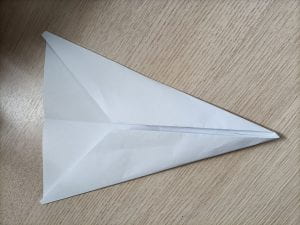
Here are a series of pictures showing how to fold the planes.
Fold paper in half

Fold the ends

Fold the ends a second time
Fold in half
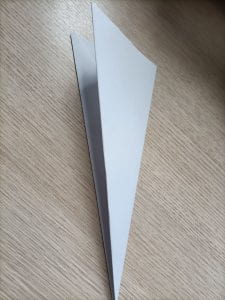
Fold the wings out
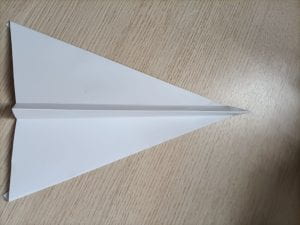
We then drew a line with chalk to mark the starting line. Then we took turns throwing the two planes and marking (or taking pictures) or which flew further.
We repeated the throw 3 times.
Results (What we found out)
The big/small plane flew further.
(Insert video or pictures here)
Or..
We measure how far each plane travelled using a metre ruler. The results are shown on this table.
| Attempt | Big plane | Small plane |
| 1 | 5.6 | 2.3 |
| 2 | 1.8 | 3 |
| 3 | 4.6 | 1.6 |
| Average distance | 3.3 | 2.3 |
Conclusion (what it means)
This is where you look at your data and think WHY did that happen?
The big/small plane flew further than the other plane.
Why I think that the small/big plane flew further because it has .….
I did some research and found out that planes with bigger wings fly further because they can generate more lift. Here is a Youtube video explaining why. Especially at 5.30 where he talks about bigger wings generating lift.
This website also has a great explanation about wing sizes a nd lift. It also talks about birds which is our teachers favourite thing so I’ll get extra points for adding this!
What I would change
Here, write or make a video on how you would change your experiment if you had to do it again. Talk about the first time you did it when you didn’t make it a “Fair” test.
DFI Week 7 – Devices
What did I learn that increased my understanding of Manaiakalani kaupapa and pedagogy?
The logistics of ubiquitous learning makes sense. ~ 1/2 of my class are born overseas, so I typically have at least one visiting family for a good portion of the term. Having the ability for them to access the work from overseas is great. They haven’t yet! But maybe one day… Also, plenty of sickness/absences which also have access more so than in the past. I’ve used Classroom quite heavily previously and I think it’s a step up.
The Summer learning is great. Just need the buy in and who can sign into it?
For some reason the “rewind” doesn’t really work for me from a semantics point of view. It didn’t in my orientation and it still doesn’t sit right with me. Probably just me. It just highlights the ubiquitous nature of the pedagogy I guess – I dislike the use of the word!
What did I learn that could improve my confidence, capability or workflow as a professional?
Screen recording – need to use this more.
It was a great idea to learn the different functionality of Chromebooks. I’ve had a play with one but was a bit ignorant as to how different they actually are.
What did I learn that could be used with my learners?
I like the idea of Harpara workspaces. From an initial observation though, it seems like this is double dipping with Sites. What’s the point in having both? Doesn’t it just add another layer of things to monitor and make sure are up to date? Ultimately I think it’s more useful than Sites. Grr…
Digital Dig is definitely something I will think about using next term or more likely at the start of next year. I didn’t get all of the way through – spent a while working out that zoom and magnify are pretty much the same thing. also find bar isn’t something that Chrome seems to understand so I’m assuming that control f.
Here’s as far as I got.
Explain everything is pretty cool. Not sure if I will use it as there’s only so many choices and while it’s voice capture is cool, is it a deal breaker? Anyway here’s a very rough page with a very rough audio recording! Oh how I cring at my voice!
I made the shortest recording of a screen ever to explain a task (to be fair, I didn’t get to start working on it until the last 20 mins as all of my Google apps stopped working – took a while to work out what was going on). Windows has screen recording via the Gamebar. That’s on option. Instead I recorded a Google Meet session where I shared a tab (i.e. a slide show).- It worked OK. Could do without the picture of me but definitely an option. I’ll look at using the gamebar and comparing sometime. Apparently Windows 11 has a very nice recording feature. My laptop isn’t that up to date. My class mostly know how to do this already on their Chromebooks.
And the transcript – with minimal editing…
Darren Smalley: I don’t know going to work, but I’m going to try and basically make a very quick lesson. On a 24 hour. Or in this case, a 48 hour, digital footprint over the weekend. Let’s assume that it’s Monday and If you go to Google Sites page and go to the Wānanga page within that you will see that there is a slideshow. Click on the slideshow and make a copy. I then want you to think about all the places you went online to the weekend. Because I know you’re all I’m doing school work, obviously, and you can also look at your history on your Chromebook, which is to do that. You would hit Control H. I’m also think about places you went on your phone and social media. And I want you to trace your digital footprint around the island over the last 48 hours. So that’s from when you work on Saturday, essentially to now.
Darren Smalley: And, but little icons and and copy and paste the footprints. So, control-c, control V, copy paste. And make your way around the island of all the places you visited over the weekend. This is what’s known as your digital footprint, and it’s the traces that you’ve left of yourself online. For the last 48 hours, give it a go.
What did I learn that could improve my confidence, capability or workflow in my personal life?
I’m not sure.
DFI – Week 6 – Enabling Access
What’s on my mind?
Honestly, there was an awful lot of talking over the first 90 mins. Struggled to maintain focus. Wrote the beginning of a reflection I’ll use in another week..
What did I learn that increased my understanding of Manaiakalani kaupapa and pedagogy?
Make all learning visible.
What did I learn that could improve my confidence, capability or workflow as a professional?
Updated my Google Site from this:
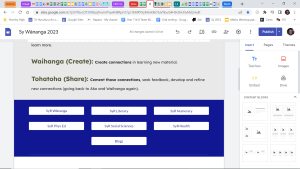
to this:
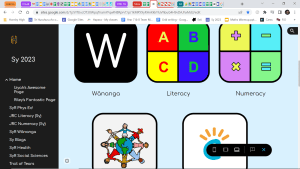
What did I learn that could be used with my learners?
- Making more funky button for my Site, hopefully making it a bit more engaging. Put everything on the Site. I tend to share via Harpara quite a bit and these don’t always get added to the site
- Harpara workspace looks interesting. Really needed more than 5 mins to digest that. Hopefully will sign up to that next week.
What did I learn that could improve my confidence, capability or workflow in my personal life?
All work stuff this week.
DFI Week 4 – Dealing with Data
-
What did I learn that increased my understanding of Manaiakalani kaupapa and pedagogy?
- I’m feeling cynical today and this might not be my most detailed post.
- I personally don’t use social media (SM) for sharing. I wonder if this is an autism thing (I’m not diagnosed but runs in the family and I’d be surprised if I’m not somewhere on the scale, I think most PhDs are!) as I’m not at all fussed about the world knowing what I’m up to and I don’t really want to know what they had for dinner. There is some evidence that SM is used primarily for entertainment purposes by the autistic community and for social connections by non-autistic. I think I can relate to that. It seems that half of social media just feeds into narcissism. Nothing quite like the buzz of getting 100s of likes on a post – it’s an addiction I don’t need (on the rare occasions I do post something creative, I look for the likes!) and in the grand scheme of things is it something we should be promoting? SM is the cause for many of the disputes we have at school (at least 50% – anecdotal evidence), I guess the advantage of blogs is that they don’t have a big audience so the likes/comments are more likely to be meaningful (I’m sure there are much better researched answers than this – it’s not my expertise and I certainly have no intention on writing a masters thesis on it, so I’ll leave the deep thinking to those who know best). Bit of a braindumpy purposeless kind of rant… sorry about that.
-
What did I learn that could improve my confidence, capability or workflow as a professional?
- Need to get better with feedback on Blogs and looking at other blogs. For the students development and mine. Use Harpara to review comments – dashboard.
- Sheets – save as filter view (quite handy – maybe – edit: I tried using this during the week for some analysis – it was OK but found it a bit clunky – if you could save the filter as a new tab, that might help…FIX IT GOOGLE!).
- Sheets – =google translate is killer for translating into māori.
- Sheets – Conditional formatting for highlighting assessment data – I use this but not for this purpose, there’s a cool pseudo-heatmap feature which is killer and a time saver – best thing I’ve found so far – should show someone as it wasn’t covered and is super-cool.
-
What did I learn that could be used with my learners?
- Blogging book reviews, recipes etc…
- Forms – use Mote (extension) for audio.
- Forms – make it a quiz – can lock it so cannot research the answer.
- Teach the class how to make a form – Social Science.
- Analysing data from a student blog. Cool activity for the class – though 1/2 my class are new to the country so insufficient data.
- This is a very simple barchart of some blogging data. TBH I didn’t put much effort into it as not really keen on data entry for the sake of it – DFI
- My Maps
- I think the coolest thing on may maps is importing data/locations from Sheets and therefore Forms. This is something we can do next week.
- Here’s my very rough holiday map
-
What did I learn that could improve my confidence, capability or workflow in my personal life?
- See above for holiday map.
DFI Core Business – Week 1
Week 1.
What did I learn that increased my understanding of Manaiakalani kaupapa and pedagogy?
Equity
Every child deserves the opportunity to achieve their potential. Agree, but with the lack of resources, how is this achievable?
If Manaiakalani is so successful, why aren’t higher decile schools adopting the practice? Or is it that their students are at their potential (somewhat) so less of an advantage?
What did I learn that could improve my confidence, capability or workflow as a professional?
Google Groups.
Already set up in Hapara. Not sure I will use it directly. Student emails sent via Harpara and whanau via Kamar.
Bookmarks.
Used to use religiously. Now never. Omni bar is faster so use that.
Drive
Again with Drive folders/organisation. If sharing e.g. planning/assessment (also files that I access on a regular basis), these files I keep very organised. For other files, “search” works just fine and is way faster than multiple clicks.
What did I learn that could be used with my learners?
Docs
- Paste without formatting in docs. Quite like. Used in spreadsheets but this is handy.
- Don’t underline!
- Smartchips – @ add date, drop down menus etc.. very good.
- Tools – explore – allows web searching within word. Can add images etc…
- Add ons – Word cloud generator and Kaizena seem useful.
- 0 margin for digital only
- Ctrl k to add link
- Remove.bg to remove background of an image for example this visual timetable (not quite finished yet).
Cybersmart
Check out and use the Manaiakalani cybersmart site.
What did I learn that could improve my confidence, capability or workflow in my personal life?
I’m not sure to be honest. Most of this week focussed on tools and enhancing the experience of using Google docs (primarily). I rarely use docs in my personal life…, it’s also highly unlikely I will revert to using bookmarks again – I’m happier not using them!